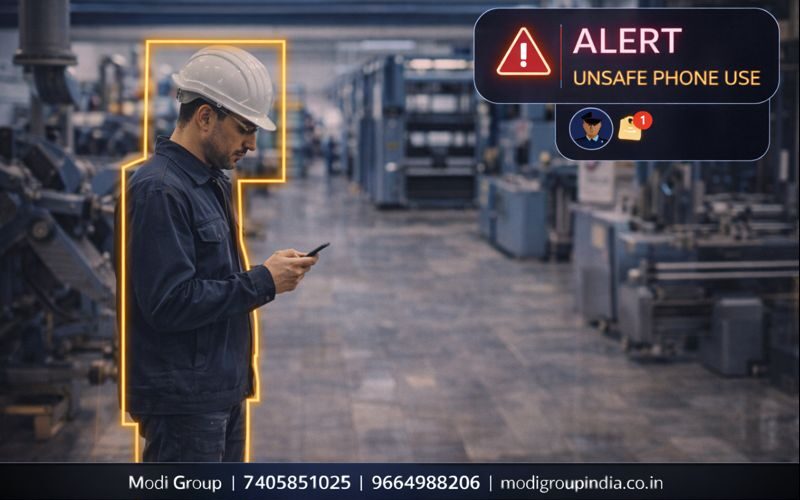
Restricted Area में Mobile Phone use दिखे—तो तुरंत Alert मिले
Factory floor, machine area, exam hall और secure office जैसे स्थानों पर मोबाइल का गलत उपयोग accident risk, policy violation और security leak का कारण बन सकता है। Mobile Phone Usage Detection का उद्देश्य है— कैमरे के वीडियो में mobile phone को पहचानकर (restricted zone के नियमों के अनुसार) alert देना, ताकि supervisor समय पर action ले सके।
Meaning, working, example, फायदे, उपयोग की जगह, सही setup, false alert कम करने के तरीके और FAQ।
विषय सूची
यह feature “सही zone + सही नियम” पर सबसे अच्छा चलता है। पूरे factory को zone बनाने से false alert बढ़ सकते हैं।
अर्थ: Mobile Phone Usage Detection क्या होता है?
Mobile Phone Usage Detection का मतलब है— कैमरे के वीडियो में किसी व्यक्ति के हाथ में mobile phone (use के संकेत के साथ) को पहचानकर, restricted zone के नियमों के अनुसार alert देना।
AI Smart CCTV यह कैसे काम करता है
- 1) Zone तय: machine area, production line, exam hall जैसी जगह define
- 2) Object detection: phone + हाथ की स्थिति पहचानने की कोशिश
- 3) Rule check: क्या यह “restricted time/zone” में है?
- 4) Violation event: नियम टूटे तो event बने
- 5) Alert: supervisor/security को सूचना + log/clip (setup अनुसार)
Alert के बाद क्या करें (SOP)
- Verification: screen पर देख कर confirm करें
- Correction: worker को safe तरीके से remind करें
- Repeat violations: policy के अनुसार action
- Report: weekly/monthly trends से training plan
असली उदाहरण
Factory floor में heavy machine के पास rule है: “काम के समय mobile phone use नहीं करना है।”
- worker ने machine के पास phone उठाया
- AI ने restricted zone में phone detect किया
- supervisor को alert मिला
- समय पर counseling हुई और accident risk कम हुआ
मुख्य फायदे
- Industrial safety: distraction कम, accident risk कम
- Policy compliance: restricted zone नियम लागू
- Productivity: काम के समय focus बेहतर
- Supervision आसान: manual निगरानी की जरूरत कम
- Audit support: log/clip से रिपोर्टिंग में मदद
कहाँ सबसे ज्यादा उपयोगी है
- Factory (machine area, production line, assembly)
- Warehouse (forklift lanes के पास)
- Exam hall (policy monitoring)
- Secure offices (restricted rooms/sections)
- Lab / Testing area (procedure compliance)
सही setup कैसे करें
- Camera angle: हाथ/upper-body clear दिखे—बहुत ऊँचा angle avoid करें
- Zone tight रखें: machine/operator area को ही cover करें
- Schedule rules: lunch break में allow, shift time में strict (जैसा आपकी policy)
- Alert routing: supervisor + safety officer तक सही route
- Trial period: 7–10 दिन test करके threshold/sensitivity final करें
False alert कम कैसे करें
- Similar objects: remote/tool/receipt scanner को phone समझ सकता है—zone/angle ठीक करें
- Lighting: glare/reflective background कम रखें
- Distance: बहुत दूर से phone छोटा दिखता है—camera position सही करें
- Combine rules: phone detect + restricted zone + shift time = accuracy बढ़े
- Verification SOP: alert → screen check → action
FAQ (सामान्य प्रश्न)
क्या यह feature हर phone 100% detect करेगा?
AI सहायता करता है, लेकिन 100% नहीं। सही camera angle, सही distance, और सही rules से performance बेहतर होता है।
Exam hall में इसका उपयोग कैसे करें?
Entrance/aisle पर zones बनाएँ, timings के अनुसार rules रखें, और alert verification के बाद invigilator SOP लागू करें।
Demo कैसे मिलेगा?
आप WhatsApp पर संदेश करके demo बुक कर सकते हैं या कॉल कर सकते हैं। हम आपकी जगह के अनुसार zone और rules बनाकर दिखाते हैं।