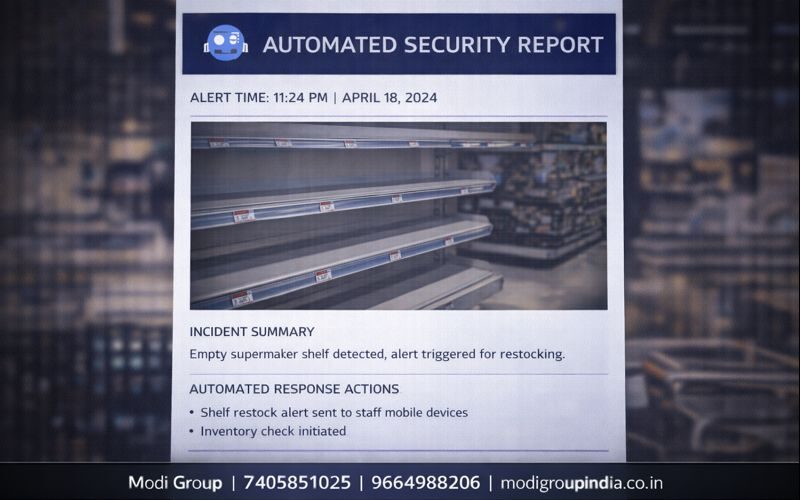
घटना के बाद “report बनानी” नहीं पड़ेगी—AI खुद बना देगा
Incident Auto Report का मतलब है—जैसे ही कोई event (जैसे Intrusion, Fire, Fighting, Tampering) detect होता है, सिस्टम अपने आप professional report तैयार कर देता है। Report में date-time, camera, location/zone, snapshot, और जरूरत हो तो clip link भी automatically attach हो जाते हैं।
“Alert आया → report बनी → management को चली गई”
विषय सूची
जब site पर incident होता है, सबसे बड़ा सवाल होता है: “Proof कहाँ है?”
Auto report वही proof व्यवस्थित तरीके से ready कर देती है।
Matlab: Incident Auto Report Generation क्या होता है?
Incident Auto Report का मतलब है— event होने के बाद security team को अलग से “report लिखनी” नहीं पड़ती। AI system अपने आप professional report बना देता है, ताकि management, audit और compliance के लिए documentation ready रहे।
यह कैसे काम करता है (Simple Steps)
- 1) Event detect: intrusion/fire/tampering जैसे event detect होते हैं
- 2) Evidence collect: time-stamp, camera, zone, snapshot auto capture
- 3) Clip tagging: उसी time का video clip link auto attach
- 4) Template fill: report template में details अपने आप भरती हैं
- 5) Export: PDF और/या Excel/CSV generate
- 6) Share: Email/WhatsApp/Dashboard पर auto share (rules के हिसाब से)
यह report “किसको” फायदा देती है?
- Owner/Management: एक नजर में पूरा incident समझ जाता है
- Security Supervisor: shift में action track कर सकता है
- Audit/Compliance: proof organized मिलता है
- HR/Operations: repeated incidents का record साफ रहता है
Report में क्या-क्या होता है? (Contents)
| Section | Report में क्या आता है | क्यों जरूरी है |
|---|---|---|
| Incident Summary | Incident type + short description | 1 line में clear understanding |
| Date & Time | Start time, end time, duration | Timeline proof + audit |
| Camera Details | Camera name/ID, location/zone | Exact point of incident |
| Snapshot Evidence | Auto screenshot (before/after) | Fast proof (video देखे बिना) |
| Clip Link | Short video clip / playback link | Full evidence verification |
| Timeline | Minute-by-minute key moments | Investigation speed up |
| Action Taken | Guard response / escalation note | Accountability + closure |
| Remarks | Supervisor/manager notes (optional) | Repeat issues identify |
Formats + Sharing (PDF/Excel/Share)
- PDF: professional printable report (audit-friendly)
- Excel/CSV: bulk analysis, monthly summary, MIS reporting
- Email: management mail group को auto send
- WhatsApp: supervisor/owner को quick share (limited data)
- Dashboard: incident list + filters (date, camera, zone)
Example: Intrusion Event (Factory)
Factory की boundary के पास Intrusion detect हुआ। System ने तुरंत alert के साथ report तैयार कर दी:
- Report में date-time और Camera-07 / Zone-B auto आया
- 1 snapshot “entry moment” का attach हुआ
- 30–45 sec का clip link attach हुआ
- Email से management को report गई
- Supervisor ने “Guard dispatched” note add किया
मुख्य फायदे (Benefits)
- Manual reporting almost zero: time बचता है
- Audit & compliance easy: documentation standard रहता है
- Professional proof: snapshot + timeline के साथ
- Fast decision: management को clear summary मिलती है
- Repeat incident control: history से weak zones identify
सही Setup Tips (Report quality के लिए)
- Camera naming: हर camera का proper name + location रखें (जैसे Gate-1, Warehouse-A)
- Zone mapping: zones clearly define करें ताकि report में “exact area” आए
- Clip length: default clip (जैसे 10 sec before + 20 sec after) set करें
- Templates: company format के हिसाब से PDF template बनाएं (logo, header, footer)
- Sharing rules: escalation list सही रखें (Level-1, Level-2)
- Data retention: evidence clips कितने दिन रखने हैं, policy fix रखें
FAQ (सामान्य प्रश्न)
क्या report हर alert पर बनेगी?
Rules set करके decide किया जा सकता है—कौन सा incident “report-worthy” है। जैसे intrusion/fire/tampering पर हमेशा report और minor alerts पर optional।
PDF/Excel दोनों चाहिए तो?
हाँ, export settings में PDF + Excel/CSV दोनों enable किए जा सकते हैं।
क्या report में company logo और format आएगा?
हाँ, template-based reporting में logo, header, footer, signature block आदि customize किया जा सकता है।
WhatsApp पर report कैसे भेजेगा?
Automation rule से short summary + link भेजा जा सकता है। Full PDF management email पर बेहतर रहता है।