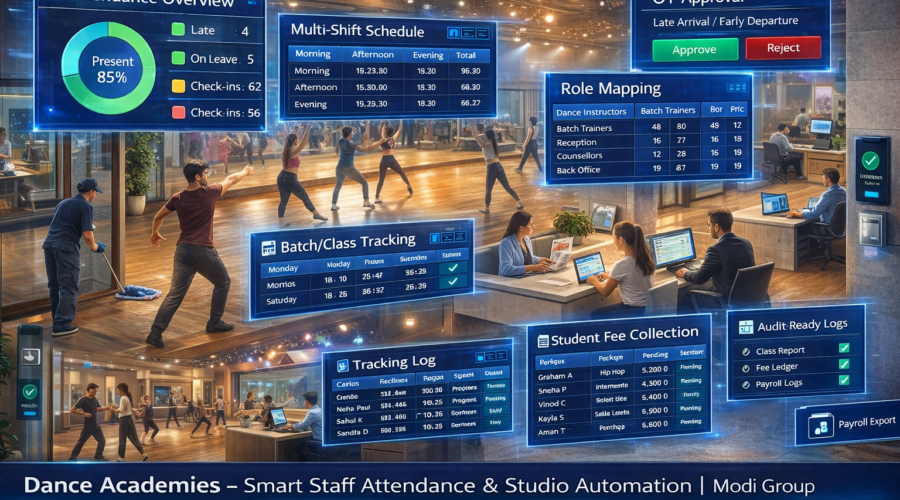
Dance Academies – Staff Attendance + Multi-Shift + Dance Instructors/Batch Trainers/Reception/Counsellors/Back Office Role Mapping + Late/Early Rules + OT Approval + Batch/Class Schedule Tracking + Trial Class & Enquiry Logging + Student Fee Collection Accountability + Studio Access Control + Audit-Ready Logs + Payroll Export Automation | Modi Group ✅
Dance academy me attendance sirf HR nahi — batch timing discipline, instructor punctuality, studio scheduling, enquiry-to-admission conversion, fee collection tracking aur event rehearsals sab role mapping + schedule tracking se linked hota hai. Agar multi-shift + batch tracking + lead logs + fee accountability strong nahi hoga toh missed classes, parent complaints, revenue leakage aur payroll disputes create hote hain.
1) Requirements — Dance Academy Setup
A) Roles (Studio + Front Desk)
- Academy Manager (daily ops + discipline)
- Reception / Front Desk (calls + enquiries + student coordination)
- Counsellor / Admissions (trial conversion + packages)
- Dance Instructor (classes + choreography)
- Batch Trainer (kids/adults/style-wise batches)
- Event/Rehearsal Coordinator (shows, competitions, workshops)
- Housekeeping (studio hygiene)
- Back Office / Accounts (fee records + payroll export)
B) Shift Inputs (Batch Practical)
- After-School Shift (kids peak)
- Evening Shift (adult peak)
- Weekend Batches (Sat/Sun roster)
- Rehearsal Extended Shift (event time OT)
- Workshop Slots (guest faculty / special)
C) Policies (Quality + Parent Trust + Revenue Control)
- Grace time (example: 5–10 min)
- Late/Early rules (batch start strict)
- Half-day (example: <50% shift)
- OT slab (30 min rounding)
- OT approval (Manager → Owner/HR)
- Batch mapping (which instructor ran which batch)
- Trial class logging (enquiry → trial → admission)
- Fee collection accountability (front desk daily register)
- Audit log (edits + approvals record)
D) Device + Network Requirements
- Face Attendance / Biometric (anti-proxy + fast)
- LAN/WiFi internet (cloud dashboard)
- UPS backup (batch start no downtime)
- Admin PC/Laptop (reports + payroll export)
2) Use Cases (Dance Academy Real Scenarios)
1) Batch Start Discipline (On-Time Classes)
Parents/students wait na kare: class punctuality proof.
2) Instructor Availability Proof
Continuity: instructor roster + punch proof.
3) Trial-to-Admission Conversion Tracking
Admissions improve: enquiry + trial logging + follow-up.
4) Rehearsal / Event OT Control
Events me approved OT only payroll me add.
5) Fee Collection Accountability (Front Desk)
Leakage prevent: daily fee entry + audit-ready logs.
3) Common Problems (Dance Academies)
- Late class start → parent complaints
- Instructor absence → cancellations + dropouts
- Trial follow-up weak → lost admissions
- Unapproved OT → payroll disputes
- Fee tracking weak → revenue leakage
- Front desk accountability missing → lead leakage
4) Dance Academy Workflow Mapping
Pre-Batch (Opening)
- Reception + instructors punch-in
- Batch schedule confirmation (studio-wise)
- Floor/studio readiness checklist (music/system/cleanliness)
During Classes
- Batch-wise instructor mapping (who conducted which batch)
- Trial class entries + follow-up assignment
- Fee collection entry (daily register) + receipt discipline
Closing
- Punch-out discipline
- OT auto calculation + approval (rehearsals)
- Daily summary (late/absent/trials/fees) report
5) Software Features (Must-Have)
- Role-based attendance (instructors/reception/counsellors/housekeeping)
- Multi-shift roster (weekday/weekend + studio timings)
- Late/Early rules with grace
- OT approval workflow
- Batch/Class schedule tracking (slot-wise mapping)
- Trial class & enquiry logging (enquiry → trial → admission)
- Fee collection accountability (daily entry register)
- Studio access control (optional staff-only / store-room)
- Mobile dashboard (owner/manager)
- Payroll export Excel/CSV
- Audit log (edits + approvals)
Optional Add-ons
- Daily WhatsApp report (late/absent/OT + trials summary)
- CCTV integration (reception + studio entry)
- Visitor log / gate register (optional)
6) Shift + OT Policy (Recommended)
| Item | Recommended | Why it matters |
|---|---|---|
| Grace | 5–10 min | Practical reporting |
| Batch Start Rule | After grace → strict | Parent trust + retention |
| Trial Follow-up | Same-day / 24 hours | Conversion boost |
| Half Day | < 50% shift | Fair payroll logic |
| OT Slab | 30 min rounding | Standard OT |
| OT Approval | Manager → Owner/HR | Disputes reduce |
7) Recommendations (Owner Control Tips)
- Batch punctuality strict rakho (zero late start)
- Backup instructor roster ready rakho
- Trial logging daily compulsory karo
- Fee collection register daily reconcile karo
- OT approvals mandatory rakho (rehearsals/events)
- Daily WhatsApp report owner ko auto bhejo
8) Example Setup (Sample Dance Studio)
- Shifts: Weekday (2pm–10pm), Weekend (10am–8pm)
- Grace: 10 min
- OT slab: 30 min
- Approval: Manager → Owner
- Payroll: Monthly Excel export + audit
Batch/Role Mapping Example
| Role | Shift | Slot | Mapping |
|---|---|---|---|
| Reception | Weekday | 2–10 | Front Desk + Enquiries |
| Instructor | Weekday | 4–5 | Kids Hip-Hop Batch |
| Instructor | Weekday | 7–8 | Adult Bollywood Batch |
| Counsellor | Weekday | 5–9 | Trials + Admissions |
| Housekeeping | Split | All day | Studio Hygiene |
9) Reports (Owner-Friendly)
- Daily attendance (present/absent/late)
- Shift-wise coverage (weekday/weekend)
- Batch schedule report (conducted/cancelled)
- Trial & enquiry log (new leads + follow-ups)
- Fees accountability report (daily/weekly summary)
- OT requested vs approved
- Monthly payroll export (Excel/CSV)
Payroll Export Columns (Recommended)
- Employee ID / Name
- Role (Instructor/Reception/Counsellor/Housekeeping)
- Shift tag
- Present/Absent/WO
- Late count + minutes
- Approved OT hours
- Payable days / remarks
10) Implementation (Modi Group Process)
- Requirement discussion (shifts, roles, batch timings, trial + fee logging)
- Device placement (entry/front desk)
- Device install (Face/Bio) + testing
- Policy setup (late/OT approvals)
- Batch + role mapping (instructors/classes)
- Training (manager + admin)
- Test payroll export
- Go-live + support
11) FAQs
Q1) Multi-shift supported?
Yes, weekday/weekend shifts supported.
Q2) Batch schedule tracking possible?
Yes, batch/class schedule tracking enabled.
Q3) Trial class logging?
Yes, enquiry → trial → admission logging supported.
Q4) Fee collection accountability possible?
Yes, daily fee entry + audit logs can be maintained.
Q5) OT approval?
Approved OT only payroll me count hota hai.
Q6) Payroll export?
Excel/CSV export ready milta hai.
12) Contact / Demo – Ahmedabad
Share for exact quote: staff count, shifts, roles (instructors/reception/counsellor), batch timings, trial logging need, fee accountability need, OT policy, payroll format.
📞 9664988206 / 7405851025
📧 modigroupahm@gmail.com
Quick Quote
- Staff count (instructors/reception/counsellor/housekeeping)
- Shifts (weekday/weekend)
- Batch timings (kids/adults/styles)
- Trial logging required?
- Fee accountability required?
- OT policy (approval?)
- Payroll format