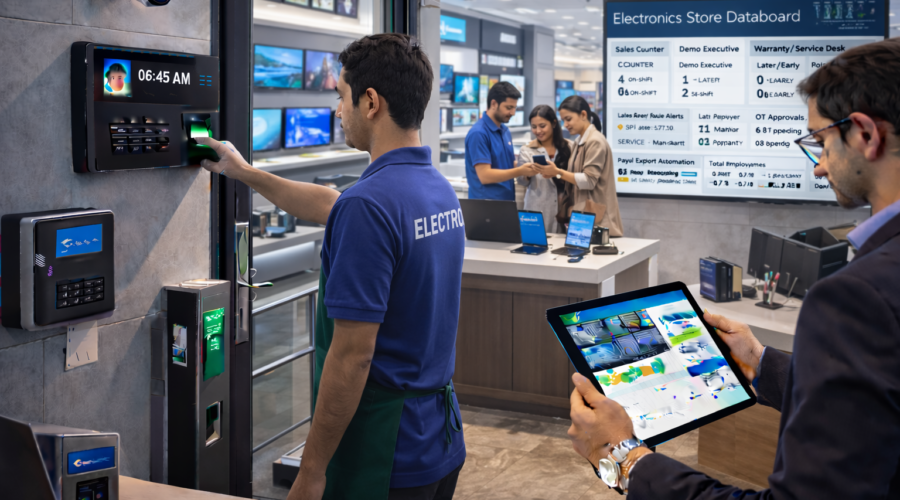
Electronics Stores – Staff Attendance + Multi-Shift + Counter & Demo Executive Tracking + Late/Early Rules + Weekend/Festival OT + Service Desk Mapping + Installation Coordination + Payroll Export Automation | Modi Group ✅
Electronics stores me daily operations fast moving hote hain: sales counters, demo experience zones, billing queue, product inward, warranty/service desk, installations scheduling, weekend rush, festival offers. Agar attendance + shift roster + late/early rules + OT approvals + payroll export proper nahi hoga to sales loss, customer waiting time increase, incentive & OT disputes, service delays aur owner ko staffing visibility zero ho jati hai. Modi Group electronics retail workflow ke hisaab se policy-based attendance + role mapping + branch-wise MIS setup karta hai.
- 1) Requirements01
- 2) Use Cases02
- 3) Common Problems03
- 4) Store Workflow Mapping04
- 5) Software Features05
- 6) Shift + OT Policy06
- 7) Recommendations07
- 8) Example Setup08
- 9) Reports & Payroll Export09
- 10) Implementation Plan10
- 11) FAQs11
- 12) Contact / Demo12
1) Requirements — Electronics Store ke liye kya decide karna hota hai?
Goal: counter coverage + demo experience + service speed + dispute-proof OT + payroll-ready export.
A) Store & Staff Inputs
- Store type: multi-brand showroom / company outlet / small retail / large format
- Staff count: sales executives, demo executives, billing, store manager, security, housekeeping (optional)
- Departments: Mobile, TV, Laptop, Appliances, Accessories, Warehouse/Backroom, Service Desk
- Vendor staff: brand promoters (Samsung/LG etc.) separate track chahiye?
B) Shift & Timing Inputs
- Store timing: opening/closing + pre-opening setup + closing cash/stock routine
- Shift model: 2 shift / 3 shift / peak overlap shift (weekends)
- Weekend rush: Saturday/Sunday staffing rule
- Festival offers: extended hours + OT approval
C) HR Policy Inputs
- Grace: 5–10 minutes
- Late/Early: half-day/full-day thresholds + late count rules
- Missing punch: approval by manager/HR + remarks
- OT: rounding slab (15/30/60 min) + approval workflow
- Payroll export: Excel/CSV mapping (payable days, LOP, OT hours)
2) Use Cases — Electronics stores me practical situations
Use Case 1: Counter coverage & billing queue control
Peak time pe billing counter empty hua toh customer drop ho jata hai. Shift roster + role mapping se cashier coverage assured rehti hai.
Use Case 2: Demo zone performance
Demo executive absent → customer experience low → conversion down. Demo staff attendance separate track karke manager immediate action le sakta hai.
Use Case 3: Weekend rush staffing
Weekend me footfall high. Overlap shift (evening peak) add karke sales counter overload avoid hota hai.
Use Case 4: Festival extended hours OT
Diwali/New Year offers me store late close hota hai. Approved OT only payroll me count hone se disputes band.
Use Case 5: Service desk accountability
Warranty/service complaints ka turnaround time staff availability pe depend karta hai. Service desk mapping se delays reduce hote hain.
Use Case 6: Installation team coordination (optional)
AC/TV installation scheduling ke liye coordinator attendance + timing important hoti hai. Attendance discipline → fewer reschedules.
3) Common Problems — System ke bina kya hota hai?
- Billing delay due to late cashiers
- Demo executive absence → conversion drop
- Weekend understaffing → customer walkout
- OT disputes during festival closures
- Promoter attendance mix-up (vendor billing issue)
- Payroll export mismatch (LOP/OT wrong)
- Service desk delays due to staff gaps
Fix: shift roster + approvals + OT engine + role/department reports + payroll export.
4) Store Workflow Mapping — Electronics retail ke hisaab se
A) Roles mapping (Recommended)
- Sales Exec: Mobile/TV/Laptop/Appliances counters
- Demo Exec: premium product demos (TV wall / home theater / appliances)
- Cashier: billing queue handling
- Backroom/Stock: inward/outward, serial number checks
- Service Desk: warranty claims, repair follow-ups
- Coordinator: installation scheduling (optional)
- Promoter: brand promoters separate category (optional)
B) Daily flow (best practice)
- Pre-opening: POS readiness + demo power-on checks + rack setup
- Peak hours: billing + demo staffing max
- Closing: cash closing + stock/serial audit + demo shutdown
C) Approval workflow
- Missing punch: employee request → store manager approval
- OT: manager recommended → HR final (optional)
5) Software Features — Electronics store ready
1) Attendance + Policies
- Grace time + late count rules
- Half-day/full-day thresholds
- Auto absent marking + weekly off/holiday calendar
2) Shift + Roster
- 2/3 shifts + overlap shift templates
- Weekend rush roster template
- Festival extended hours roster
3) OT Engine + Approval
- OT slab rounding (15/30/60 min)
- Approved OT only payroll me count
- OT cost visibility (optional MIS)
4) Role/Department Reports
- Counter coverage report
- Demo staff presence report
- Cashier attendance & billing coverage
- Service desk availability & exceptions
5) Payroll Export
- Payable days + LOP
- Approved OT hours
- Monthly Excel/CSV export
6) Shift + OT Policy — Recommended (Dispute-proof)
| Policy Item | Recommended Setting | Why it matters |
|---|---|---|
| Grace Time | 10 minutes | Minor delay buffer, discipline control |
| Half Day | < 50% shift present | Clear payroll rule |
| OT Slab | 30 min rounding | Stable salary calculations |
| OT Approval | Store Manager → HR | Only approved OT counts |
| Weekend Rush | Peak overlap shift | High conversion hours covered |
7) Recommendations — Best setup for electronics retail
Highly Recommended ✅
- Role/department mapping (Sales/Demo/Cashier/Service)
- Weekend overlap shift
- OT approval workflow
- Promoter separate tracking (if applicable)
- Monthly payroll export mapping + audit
Budget Setup
- Single entry device
- Basic attendance + export
- Manual OT approval
Premium Setup
- Multi-branch dashboard (chains)
- Advanced MIS (counter coverage vs footfall hours)
- OT cost report + discipline score
- AMC + periodic policy review
8) Example Setup — Practical electronics store scenario
Scenario
- Store timing: 10:00 AM – 9:30 PM
- Shifts: Opening (9:45–6:15), Closing (1:30–10:00)
- Weekend overlap: 5:00–9:00 (extra cashier + demo exec)
- Grace: 10 min | OT slab: 30 min | Approval: Manager → HR
Festival OT Example
Festival closing 11:00 PM. Closing shift extra 1h OT. Approval ke baad export me OT add ho jayega.
9) Reports & Payroll Export — Owner/HR ke liye
- Daily attendance + late/early
- Counter/department wise presence report
- Demo staff attendance report
- Weekend/festival OT summary
- Missing punch approvals list
- Monthly payroll export (Excel/CSV)
- Branch-wise consolidated MIS (optional)
10) Implementation Plan — 7 steps me go-live
- Requirement call (departments/roles/shifts/policies)
- Site survey + device placement
- Installation + staff master mapping
- Shift roster + OT policy configuration
- Training (store manager/HR)
- Test payroll export (7–15 days)
- Go-live + AMC support
11) FAQs
Q1) Demo executives ko separate track kar sakte hain?
Yes, department/role wise reports possible.
Q2) Weekend overlap shift possible hai?
Yes, overlap shift templates se peak hours cover hote hain.
Q3) Festival OT automatic calculate hoga?
OT calculate hota hai, payroll me approved OT hi add hota hai.
Q4) Payroll export milega?
Yes, monthly Excel/CSV export ready format milta hai.
12) Contact / Demo – Ahmedabad
WhatsApp pe bhejo: staff count, departments, store timing, shifts, weekend overlap, OT policy, payroll format. Hum fast quote + setup plan share kar denge.
📞 9664988206 / 7405851025
📧 modigroupahm@gmail.com
Quick Quote
Share details:
- Staff count + departments
- Store timing (open/close)
- Shifts + weekend overlap
- OT policy + approvals
- Promoters (yes/no)
- Payroll export format
- Branches (if any)