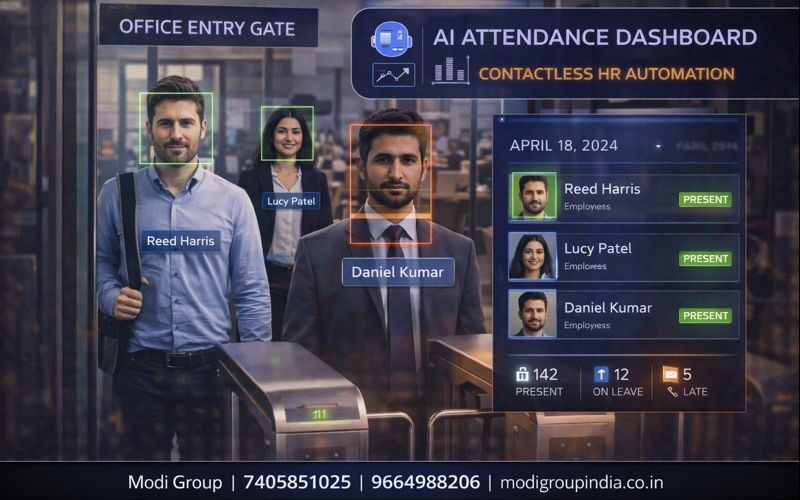
कर्मचारी आए–गए, समय के साथ रिकॉर्ड बने — यही है Video Attendance
कई जगह attendance के लिए biometric या manual register चलता है। लेकिन कई बार proxy attendance, late entry, early exit जैसी समस्याएँ आती हैं। Video Attendance System में CCTV के video से entry/exit का समय अपने आप रिकॉर्ड होकर attendance report बन जाती है—और HR का काम आसान हो जाता है।
यह सिस्टम employee consent, company policy और local laws के अनुसार ही use करें। जहाँ जरूरत हो, notice/consent process रखना best रहता है।
मतलब, working, examples, फायदे, setup tips और FAQ—सब आसान हिंदी में।
विषय सूची
Attendance “AI से” तभी सही बनेगी जब entry/exit point clear हो और rules सही सेट हों।
Matlab: Video Attendance System क्या होता है?
Video Attendance का मतलब है—CCTV के video से कर्मचारी की entry और exit का time-stamp बनाना, और उसी के आधार पर attendance report तैयार करना।
यह कैसे काम करता है (Simple Steps)
- 1) Entry/Exit point चुनना: gate, door या turnstile के पास camera
- 2) Zone/Line सेट करना: virtual line/zone (entry & exit) बनता है
- 3) पहचान/track: system face/appearance के आधार पर पहचान कर सकता है (configuration के अनुसार)
- 4) Time-stamp: crossing पर time record होता है
- 5) नियम लगना: shift timing, grace time, late/early rules
- 6) Report बनना: daily/weekly/monthly attendance + late list
Report में क्या-क्या निकल सकता है?
- Daily attendance: present / absent
- Late entry: कितने बजे आए
- Early exit: कितने बजे गए
- Total working hours: entry–exit difference (rule के अनुसार)
- Shift wise: day/night shift अलग-अलग
- Gate wise: main gate / side gate logs
Example: असली जीवन का उदाहरण
मान लीजिए आपके office में timing है 09:30 AM और grace time 10 मिनट है। सिस्टम ने rule बनाया:
- 09:40 AM के बाद entry = Late
- 06:30 PM से पहले exit = Early Exit
- अगर कोई employee दिन में बाहर गया और वापस आया—तो multiple entry/exit logs भी बन सकते हैं
मुख्य फायदे (Benefits)
- Proxy attendance कम: entry/exit logs से accountability बढ़ती है
- No-touch process: biometric touch की जरूरत कम (जहाँ applicable)
- Report ready: late/early/absent list जल्दी मिलती है
- Shift control: day/night shift rules आसानी से
- Audit support: जरूरत पर video evidence/clip reference
कहाँ सबसे उपयोगी?
- Offices (reception/gate attendance)
- Factories (shift-wise entry/exit)
- Institutes (staff attendance, visitors monitoring)
- Warehouses (staff + contractor movement)
सही Setup कैसे करें (ताकि attendance सही बने)
- Camera placement: entry gate पर face height और light सही हो
- Single direction flow: entry/exit का रास्ता clear रखें
- Line/zone: gate पर virtual line सही जगह बनाएं
- Lighting: backlight (पीछे तेज रोशनी) से बचें
- Time schedule: shift timing, grace time, weekly off rules
- Trial period: पहले 3–7 दिन observation करके fine-tune करें
Policy/Consent का ध्यान (बहुत जरूरी)
- कर्मचारियों को system के बारे में साफ जानकारी दें
- जहाँ आवश्यक हो, written consent/notice रखें
- data retention (कितने दिन data रखना है) policy बनाएं
- access control: reports/footage किसे देखना है, यह तय करें
FAQ (सामान्य प्रश्न)
क्या existing CCTV में यह add हो सकता है?
कई setups में existing CCTV/NVR पर AI software/AI box से integration संभव होता है—site और camera compatibility पर depend।
अगर एक gate से बहुत भीड़ निकलती हो तो?
ऐसी जगह पर camera angle, entry-exit separation और line/zone tuning जरूरी होती है। जरूरत हो तो दो cameras लगाकर accuracy बढ़ाई जा सकती है।
Report किस format में मिलती है?
अक्सर attendance reports export (CSV/Excel) या dashboard पर मिलती हैं—solution के अनुसार।
Proxy पूरी तरह बंद हो जाएगी?
सही setup, clear entry point और policy के साथ proxy बहुत हद तक कम होती है। यह “discipline + system” दोनों से मजबूत बनता है।