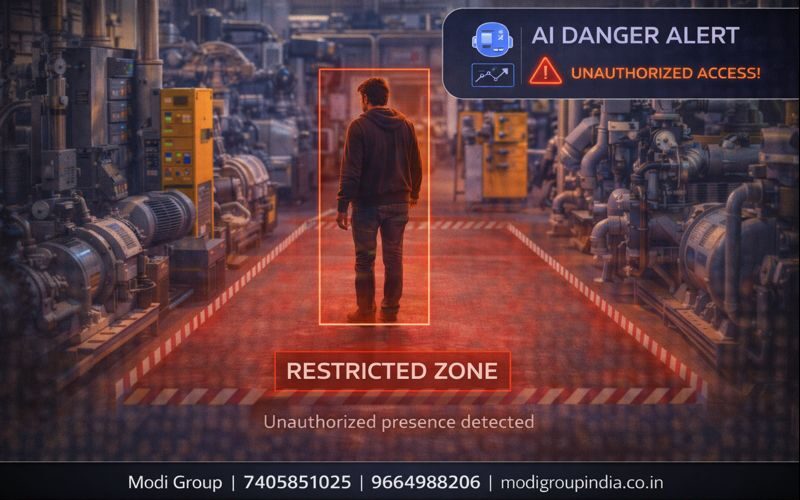
जहाँ entry मना है, वहाँ कदम रखते ही alert — यही है Restricted Area Detection
Factory में machine room, power plant में control zone, warehouse में high value storage— कुछ जगहें ऐसी होती हैं जहाँ हर किसी का जाना सुरक्षित नहीं होता। Restricted Area Detection में कैमरे में एक forbidden zone बनाया जाता है और जैसे ही कोई unauthorized व्यक्ति उस zone में आता है, तुरंत alert मिल जाता है।
“Zone बनाओ → unauthorized entry हो → alert मिल जाए → नुकसान/accident से पहले action हो जाए”
विषय सूची
Zone गलत बनेगा तो alert गलत आएगा। सही camera angle + सही zone boundary सबसे जरूरी है।
Matlab: Restricted Area Detection क्या होता है?
Restricted Area Detection का मतलब है— कैमरे के video में एक ऐसा restricted/forbidden zone बनाना जहाँ entry allowed नहीं है, और कोई व्यक्ति/वाहन उस zone में घुसे तो तुरंत alert मिलना।
यह कैसे काम करता है (Simple Steps)
- 1) Camera view चुनना: entry point/area साफ दिखे
- 2) Zone बनाना: restricted boundary draw की जाती है
- 3) Rule सेट करना: कौन allowed है/कब allowed है (time-based)
- 4) Detection: AI movement detect करता है (human/vehicle)
- 5) Violation: zone में entry होते ही event बनता है
- 6) Alert: mobile/monitor/control room पर notification + clip
Alert में क्या-क्या मिल सकता है?
- Camera name + location
- Time-stamp (कब violation हुआ)
- Snapshot/clip (सबूत के लिए)
- Event type (Restricted entry)
- Escalation (response नहीं आया तो supervisor/manager तक)
Example: Factory में Machine Room
मान लीजिए factory में एक machine room है जहाँ केवल trained operator ही जा सकता है। आपने rule बनाया:
- Day shift में entry सिर्फ authorized staff के लिए
- Night shift में यह area पूरी तरह restricted
अब जैसे ही कोई unauthorized व्यक्ति अंदर कदम रखता है:
- Supervisor के mobile पर alert
- Control room में camera auto-highlight
- Clip save होकर evidence ready
मुख्य फायदे (Benefits)
- Accident prevention: खतरनाक area में गलत entry रोकी जा सकती है
- Process safety: safety rules enforce होते हैं
- Asset protection: high-value zone सुरक्षित रहता है
- Manpower dependency कम: guard हर समय देखने पर depend नहीं
- Evidence ready: incident के लिए proof available
कहाँ सबसे उपयोगी?
- Factories: machine room, hazardous zone, tool room
- Power Plants: control room, high voltage area
- Warehouses: high value storage, dispatch gate
- Hospitals: ICU entry (policy के अनुसार)
- Server Room: IT/critical room access
- Chemical Storage: restricted movement safety
सही Setup Tips (Accuracy बढ़ाने के लिए)
- Camera angle: zone boundary सीधी और साफ दिखे
- Lighting: backlight/overexposure से बचें
- Zone boundary: दीवार/door line के अनुसार boundary रखें
- Height: बहुत ऊपर से “top view” में human detection miss हो सकता है
- Multiple entry points: हर entry के लिए अलग camera/zone बनाएं
- Time rules: shift wise allow/deny सेट करें
False Alert कैसे कम करें?
- Human/vehicle classification ON रखें (जहाँ available)
- Buffer time रखें: 1–2 sec continuous presence पर ही alert
- Exclude areas: trees/shadows वाले हिस्से zone से बाहर रखें
- Time-based rule: business hours में अलग rule, night में अलग
- Direction rule: सिर्फ “outside → inside” पर alert (जहाँ applicable)
FAQ (सामान्य प्रश्न)
क्या existing CCTV में यह add हो सकता है?
कई cases में existing camera/NVR पर AI software/AI box से integration संभव होता है। Compatibility camera model, angle और required feature पर depend करती है।
क्या यह night में भी काम करेगा?
हाँ, लेकिन night में lighting, IR performance और camera clarity important है। सही camera + सही light के साथ detection बेहतर रहता है।
Alert कहाँ आता है?
Solution के अनुसार mobile app, control room monitor, email/SMS/WhatsApp या siren/light automation तक alert जा सकता है।
अगर authorized person अंदर जाए तो?
Authorized list/time window के rules लगाकर alert को avoid किया जा सकता है। जैसे: day shift में allow, night shift में deny।